 Analog
 On this page
Routing
Analog supports filesystem-based routing on top of the Angular Router.
Defining Routes
Routes are defined using folders and files in the src/app/pages folder. Only files ending with .page.ts are collected and used to build the set of routes.
There are 5 primary types of routes:
These routes can be combined in different ways to build URLs for navigation.
Index Routes
Index routes are defined by using the filename as the route path enclosed in parenthesis.
The example route below in src/app/pages/(home).page.ts defines an / route.
@Component({
  template: ` <h2>Welcome</h2> `,
})
export default class HomePageComponent {}Static Routes
Static routes are defined by using the filename as the route path.
The example route below in src/app/pages/about.page.ts defines an /about route.
@Component({
  template: `
    <h2>Hello Analog</h2>

    Analog is a meta-framework on top of Angular.
  `,
})
export default class AboutPageComponent {}
It's also possible to define nested static routes in two different ways:
- By nesting the route files in folders -
src/app/pages/about/team.page.tsdefines an/about/teamroute. - By using the dot notation in the filename -
src/app/pages/about.team.page.tsalso defines an/about/teamroute.
Route Groups
Routes can be grouped together in the same folder without adding a route path segment by wrapping a folder name in parenthesis.
src/
└── app/
    └── pages/
        └── (auth)/
            ├── login.page.ts
            └── signup.page.ts
The above example defines /login and /signup routes.
Dynamic Routes
Dynamic routes are defined by using the filename as the route path enclosed in square brackets. The parameter for the route is extracted from the route path.
The example route below in src/app/pages/products/[productId].page.ts defines a /products/:productId route.
@Component({
  imports: [AsyncPipe],
  template: `
    <h2>Product Details</h2>

    ID: {{ productId$ | async }}
  `,
})
export default class ProductDetailsPageComponent {
  private readonly route = inject(ActivatedRoute);

  readonly productId$ = this.route.paramMap.pipe(
    map((params) => params.get('productId')),
  );
}
Dynamic routes can also be defined using the dot notation in the filename - src/app/pages/products.[productId].page.ts defines a /products/:productId route.
Using Route Component Input Bindings
If you are using the withComponentInputBinding() feature with the Angular Router, you can use the Input decorator, along with the same parameter name to get the route parameter.
First, add the withComponentInputBinding() to the arguments for the provideFileRouter() function.
// src/app/app.config.ts
export const appConfig: ApplicationConfig = {
  providers: [
    provideFileRouter(withComponentInputBinding()),
    // other providers
  ],
};
Next, use the route parameter as an input.
// src/app/pages/products/[productId].page.ts
@Component({
  template: `
    <h2>Product Details</h2>

    ID: {{ productId }}
  `,
})
export default class ProductDetailsPageComponent {
  @Input() productId: string;
}
Layout Routes
Layout routes are defined by using a parent file and child folder with the same name.
The following structure below represents a layout route.
src/
└── app/
    └── pages/
        ├── products/
        │   ├── [productId].page.ts
        │   └── (products-list).page.ts
        └── products.page.ts
This defines two routes with a shared layout:
/products/products/:productId
The parent src/app/pages/products.page.ts file contains the parent page with a router outlet.
@Component({
  imports: [RouterOutlet],
  template: `
    <h2>Products</h2>

    <router-outlet></router-outlet>
  `,
})
export default class ProductsComponent {}
The nested src/app/pages/products/(products-list).page.ts file contains the /products list page.
@Component({
  template: ` <h2>Products List</h2> `,
})
export default class ProductsListComponent {}
The nested src/app/pages/products/[productId].page.ts file contains the /products/:productId details page.
@Component({
  imports: [AsyncPipe, JsonPipe],
  template: `
    <h2>Product Details</h2>

    ID: {{ productId$ | async }}
  `,
})
export default class ProductDetailsPageComponent {
  private readonly route = inject(ActivatedRoute);

  readonly productId$ = this.route.paramMap.pipe(
    map((params) => params.get('productId')),
  );
}
Pathless Layout Routes
Layout routes can also be defined without adding a route path segment.
src/
└── app/
    └── pages/
        ├── (auth)/
        │   ├── login.page.ts
        │   └── signup.page.ts
        └── (auth).page.ts
The above example defines /login and /signup routes with a shared layout. The parent src/app/pages/(auth).page.ts file contains the parent page with a router outlet.
Catch-all Routes
Catch-all routes are defined by using the filename as the route path prefixed with 3 periods enclosed in square brackets.
The example route below in src/app/pages/[...page-not-found].page.ts defines a wildcard ** route. This route is usually for 404 pages.
export const routeMeta: RouteMeta = {
  title: 'Page Not Found',
  canActivate: [
    () => {
      const response = injectResponse();
      if (import.meta.env.SSR && response) {
        response.statusCode = 404;
        response.end();
      }
      return true;
    },
  ],
};

@Component({
  imports: [RouterLink],
  template: `
    <h2>Page Not Found</h2>

    <a routerLink="/">Go Back Home</a>
  `,
})
export default class PageNotFoundComponent {}
Catch-all routes can also be defined as nested child routes.
Putting It All Together
For the following file structure:
src/
└── app/
    └── pages/
        ├── (auth)/
        │   ├── login.page.ts
        │   └── signup.page.ts
        ├── (marketing)/
        │   ├── about.md
        │   └── contact.md
        ├── products/
        │   ├── (product-list).page.ts
        │   ├── [productId].edit.page.ts
        │   └── [productId].page.ts
        ├── (auth).page.ts
        ├── (home).page.ts
        ├── [...not-found].md
        └── products.page.ts
The filesystem-based router will generate the following routes:
| Path | Page |
|---|---|
/ |
(home).page.ts |
/about |
(marketing)/about.md |
/contact |
(marketing)/contact.md |
/login |
(auth)/login.page.ts (layout: (auth).page.ts) |
/signup |
(auth)/signup.page.ts (layout: (auth).page.ts) |
/products |
products/(product-list).page.ts (layout: products.page.ts) |
/products/1 |
products/[productId].page.ts (layout: products.page.ts) |
/products/1/edit |
products/[productId].edit.page.ts (layout: products.page.ts) |
/unknown-url |
[...not-found].md |
If your app uses markdown content routes like .md files in src/app/pages, add withContentRoutes() from @analogjs/router/content to your provideFileRouter() call.
Providing Extra Routes
Routes can be added manually in addition to the routes discovered through the filesystem. Use the withExtraRoutes with an array of routes to be prepended to the discovered routes array. All the routes are merged into a single array.
const customRoutes: Routes = [
  {
    path: 'custom',
    loadComponent: () =>
      import('./custom-component').then((m) => m.CustomComponent),
  },
];

export const appConfig: ApplicationConfig = {
  providers: [provideFileRouter(withExtraRoutes(customRoutes))],
};
Routes from Workspace Libraries
In a monorepo, pages, content, and API routes can live in workspace libraries. Pass their directories to analog() as workspace-relative paths that start with /:
| Option | Description |
|---|---|
additionalPagesDirs |
Directories with .page.ts and .server.ts route files |
additionalContentDirs |
Directories with markdown content routes |
additionalAPIDirs |
Directories with API routes |
workspaceRoot |
Absolute workspace root these paths resolve against |
workspaceRoot defaults to NX_WORKSPACE_ROOT, then process.cwd(). Set it when Vite runs from the app directory instead of the workspace root.
discoverLibraryRoutes() collects these directories from the src/pages, src/content, and src/api folders of libraries under libs/:
import { resolve } from 'node:path';
import { defineConfig } from 'vite';
import analog, { discoverLibraryRoutes } from '@analogjs/platform';
import angular from '@analogjs/vite-plugin-angular';
import nitro from '@analogjs/vite-plugin-nitro';

const workspaceRoot = resolve(import.meta.dirname, '../..');
const libs = discoverLibraryRoutes(workspaceRoot);

export default defineConfig({
  plugins: [
    analog({
      workspaceRoot,
      additionalPagesDirs: libs.additionalPagesDirs,
      additionalContentDirs: libs.additionalContentDirs,
      additionalAPIDirs: libs.additionalAPIDirs,
    }),
    angular(),
    nitro(),
  ],
});
Library pages are compiled automatically, so angular() doesn't need a matching include.
Visualizing and Debugging Routes
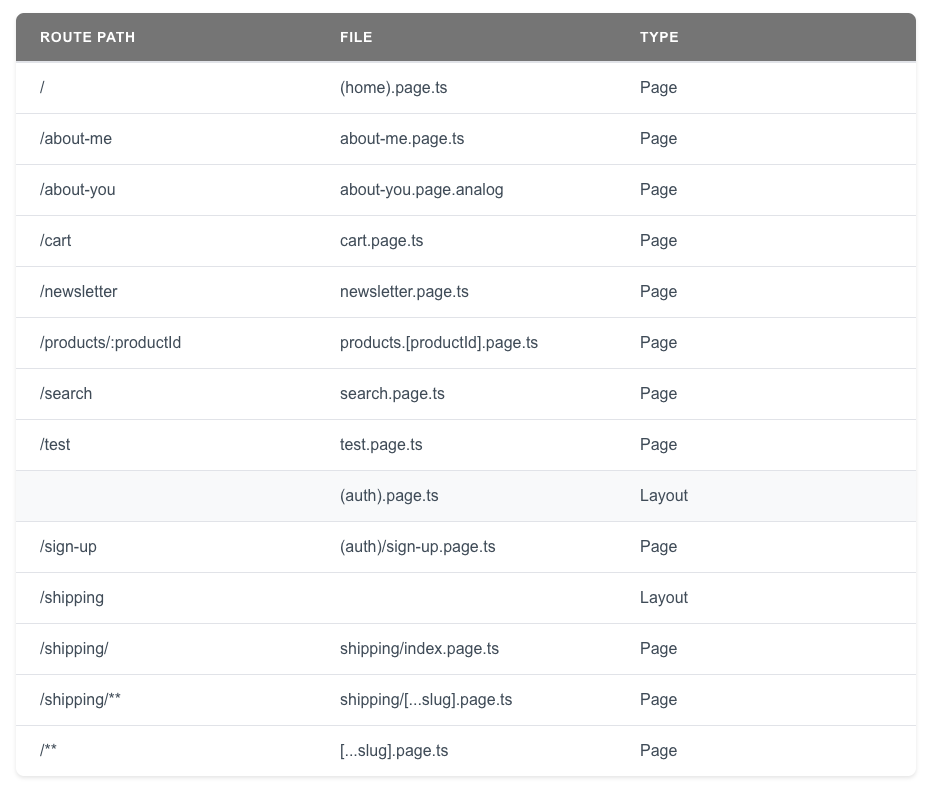
During development, Analog automatically registers a debug route that displays the pages and layouts for your application. Navigate to /__analog/routes in the browser to see the routes table. No configuration is needed — the debug route is available in any app using provideFileRouter() and is automatically removed from production builds.
If you need to register the debug route explicitly (for example, in a custom setup), you can use the withDebugRoutes() function:
export const appConfig: ApplicationConfig = {
  providers: [provideFileRouter(withDebugRoutes())],
};